
Send one link for your video, your demo recap and the next meeting.
By Shaf Shadaab · Published · Updated
You know the gap between interest and calendar. A prospect watches your video in one tab, hunts for your booking link in another, and the thread goes quiet.
With PitchPage, you put your personalized video, your booking calendar and your next step on a single page, then send it in an email, a LinkedIn message or a follow-up after a call.
How can you simplify sales follow-up with PitchPage?
You put your personalized video, your booking calendar and your next step on one page, so a prospect can watch and book from the same link instead of piecing your follow-up together.
Your outbound and follow-up messages end up spread across tools. Every extra link is one more thing for a prospect to keep track of, and a raw share link tells them nothing about who you are or why you are reaching out.
- Your video, calendar and collateral live in three different places.
- Your follow-up recap gets buried under the rest of their inbox.
- A bare share link carries none of your context or branding.
- You rebuild the same message from scratch for every account.
An example workflow
How do you build a page for sales teams?
In three steps: record the video, then build the page, then send one link.
- 1
Record the video
Record an account intro with your camera or a screen walkthrough of the product in PitchPage, upload a recap you already made, or use an existing Loom or YouTube link.
- 2
Build the page
Add the scheduling link you already use, write a greeting that names the company or the person, and add a next-step button to your proposal or order form.
- 3
Send one link
Drop the link into your sequence, your LinkedIn message or your follow-up email. Your prospect gets the video, the calendar and the next step on one page.
What goes on a page for sales teams?
One video, one booking calendar and a greeting of up to 120 characters, plus a next-step button on Pro.
- Personalized videoA camera intro or screen walkthrough recorded for this account, an uploaded file, or a Loom or YouTube link.
- Named greetingA headline that refers to their company, team or the call you just had.
- Booking calendarYour existing scheduling link — Calendly, HubSpot, SavvyCal and more — on the same page as the video.
- Clear next stepOn Pro, a button linking to your proposal, order form or checkout.
What does an example page look like?
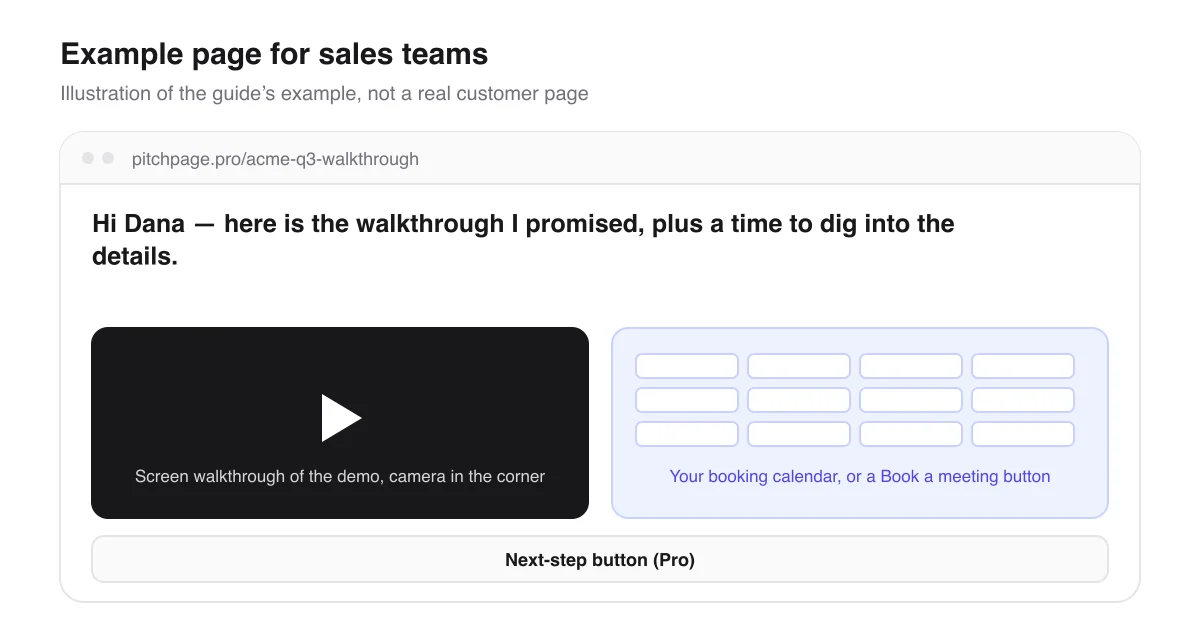
Say you have just run a demo for Acme Corp. You record a three-minute screen walkthrough recapping what Dana’s team asked about — in PitchPage, with your camera in the corner, or in Loom if that is what you use — then create a page at pitchpage.pro/acme-q3-walkthrough with the greeting “Hi Dana — here is the walkthrough I promised, plus a time to dig into the details.”
You paste the page link into your follow-up email. Dana watches the demo recap at the top of the page, and books the next call from the same page without hunting back through the thread. On Pro, a button under the calendar can point to your proposal or order form.
Page title
Acme Corp — 3-minute walkthrough
Hi Dana — here is the walkthrough I promised, plus a time to dig into the details.
An illustrative example of how this use case fills in the page — not a real customer page.
What should you know before you start?
A few limits, so the page does what you expect for sales teams.
Video and pages
- One page holds one video and one booking calendar. To send a different recap to each account, make a page per account — up to 3 during the trial, unlimited on Pro.
- The video can be recorded in PitchPage, uploaded as a file of up to 5 minutes, or a Loom or YouTube link. Bookings and confirmations still come from your own scheduling tool, and some booking pages open in a new tab instead of appearing on the page.
Payments and privacy
- PitchPage does not take payment. The next-step button is a Pro feature and links to your own order form or checkout.
- Pages start Unlisted, so a prospect’s page stays out of search. Anyone with the link can still open it, so leave out anything confidential.
Questions sales teams ask
Can I make one page per prospect?
Yes. Each page has its own address, like pitchpage.pro/acme-q3-walkthrough, and its own greeting. You can make up to 3 pages during the 7-day trial and as many as you need on Pro.
Can I record a screen walkthrough without Loom?
Yes, on a computer, where your account has native video: record a screen, window or tab with your microphone, and in Chrome or Edge your camera in a corner, for up to 5 minutes. Loom and YouTube links still work if you prefer them.
Where can I send the link?
Anywhere you can paste a URL: a sequence step, a LinkedIn message, an email after a call or a text. It is one ordinary link. You can also embed the page on your own website.
What happens when a prospect books?
The booking goes through your scheduling tool exactly as if they had used your booking link directly, so the meeting lands on your calendar with your usual confirmations.
Can I see whether a prospect opened the page?
You can see activity on the page. Analytics shows views, video plays and button clicks for each page, so a page per prospect keeps their activity separate. You see totals, not who visited or how much of the video they watched, and bookings made in your scheduling tool are not counted.
Can I use a QR code at an event or on a slide?
Yes. During the trial and on Pro, you can download a QR code for any published page as a PNG or SVG. Name a campaign, like trade-show, and Analytics shows the visits that came from that code.
What does it cost?
You pay $25/month for PitchPage Pro and can make unlimited pages, after a 7-day free trial that needs no card. The trial never turns into a paid plan on its own.
Where do the details about other tools come from?
What this guide says about embedding booking calendars and videos comes from each tool’s own documentation.
Build your first page
Put your video, your booking calendar and your next step on one link. Try PitchPage Pro free for 7 days — no credit card — then subscribe for $25/month when you are ready.
Start 7-day free trialOther ways people use PitchPage
Deciding between this and plain links? Compare PitchPage with sending a Loom link plus a Calendly link, or see how it compares with ViteLnk, Loom and Vidyard.