
Send the audit, the walkthrough and the next step as one page.
By Shaf Shadaab · Published · Updated
A proposal PDF, a Loom walking through it, a calendar link and an invoice link add up to four things your prospective client has to open and keep track of.
With PitchPage, you give each client a single branded page: your walkthrough plays, booking a call is right beside it, and your next step is one button away.
How can you present agency work with PitchPage?
You turn the audit, the walkthrough and the next step into one branded page per client, so your prospect can see the work and book the call without opening four attachments.
You want to look like the studio you actually are before the first call happens. A scattered set of links undercuts that, and building a bespoke page per client is not worth your hours.
- Your proposal arrives as an attachment that is awkward to open on a phone.
- Your audit walkthrough gets separated from the call booking.
- Your deposit link sits in a separate invoice email days later.
- Every new client means rebuilding the same page by hand.
An example workflow
How do you build a page for agency founders?
In three steps: record the audit, then wrap it in a page, then send and follow through.
- 1
Record the audit
Screen-record a narrated walkthrough of the prospect’s site, ads or funnel in PitchPage, optionally with your camera in a corner, and point at the three things you would change first. A Loom or YouTube link works too.
- 2
Wrap it in a page
Add the video, your discovery-call calendar, and a greeting naming the client. On Pro, set your brand color and hide the PitchPage badge.
- 3
Send and follow through
Send the link with the proposal, or embed the page on your agency’s site. When they are ready, the same page can point at your deposit checkout or onboarding form.
What goes on a page for agency founders?
One video, one booking calendar and a greeting of up to 120 characters, plus a next-step button on Pro.
- Screen-recorded auditA narrated walkthrough, with or without your camera, that shows you have already done the work.
- Discovery bookingYour existing scheduling link for the next conversation.
- Your brandingOn Pro, your brand color, custom background and no PitchPage badge.
- Deposit or onboarding linkOn Pro, a button to your external Stripe, PayPal or Lemon Squeezy checkout.
What does an example page look like?
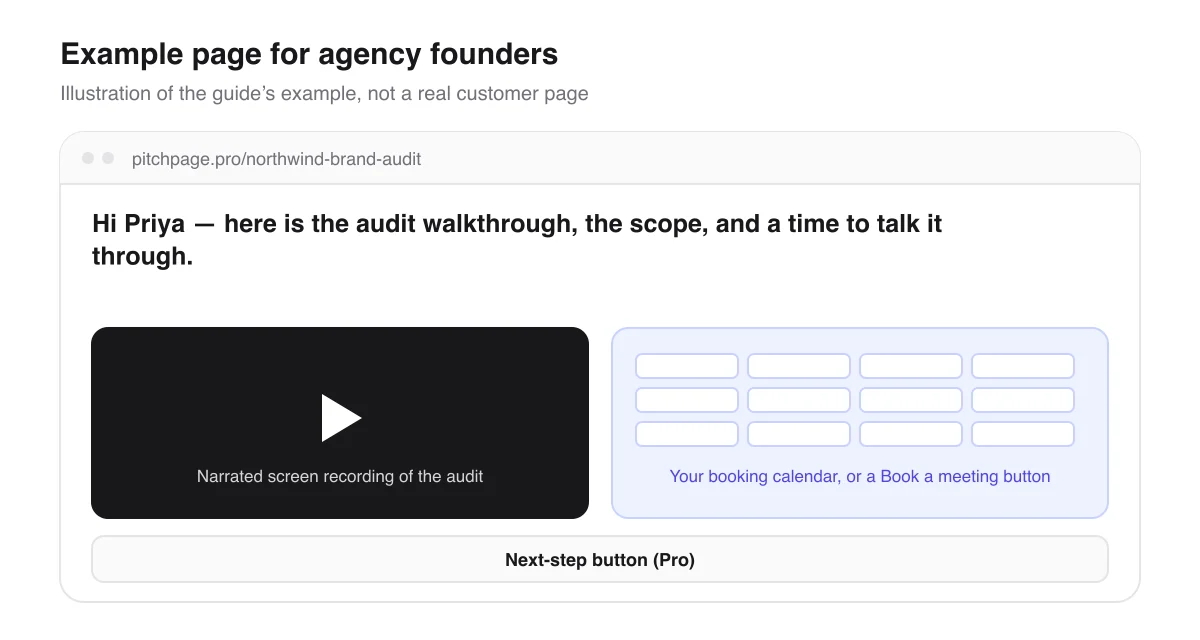
Say Northwind asked for a brand audit. You screen-record a narrated walkthrough of their site, with your camera in the corner, and the three changes you would make first, then build a page at pitchpage.pro/northwind-brand-audit with the greeting “Hi Priya — here is the audit walkthrough, the scope, and a time to talk it through.”
You send that one link with your proposal. Priya watches the audit and books a discovery call from the same page. On Pro, once you agree on scope, the button on the same page can point to your deposit checkout or onboarding form. You could also embed a general version of the page on your agency’s own site, so visitors see a sample audit and book from there.
Page title
Northwind — brand audit & scope
Hi Priya — here is the audit walkthrough, the scope, and a time to talk it through.
An illustrative example of how this use case fills in the page — not a real customer page.
What should you know before you start?
A few limits, so the page does what you expect for agency founders.
Video, pages and branding
- Each page carries one video and one calendar. If the audit and the scope need separate recordings, combine them into one walkthrough or send two pages. A recording made in PitchPage is one take of up to 5 minutes, with no editing.
- The video can be recorded in PitchPage, uploaded as a file of up to 5 minutes, or a Loom or YouTube link.
- Branding is a Pro feature: your brand color, a custom background and no PitchPage badge. The 7-day trial includes all of it.
Deposits and privacy
- PitchPage never holds a deposit. The button links to your own Stripe, PayPal, Lemon Squeezy or other HTTPS checkout, and the payment happens there.
- Pages start Unlisted and stay out of search, but anyone with the link can open one, so leave out anything a client should not forward.
Questions agency founders ask
Can I put my agency’s branding on the page?
Yes, on Pro. You can set your brand color and a custom background and hide the PitchPage badge, and your name, company and profile image appear at the top of every page.
Can clients pay a deposit from the page?
Not through PitchPage. On Pro you add a button with up to 32 characters of text, like “Pay the deposit”, that links to your own checkout.
Can I reuse one page for several prospects?
You can, but the greeting is per page, so a page per client reads better. Pro has no page limit, and changing a page’s address later keeps the old link redirecting.
What do I need before I start?
A walkthrough — recorded or uploaded in PitchPage, or a Loom or YouTube link — plus your scheduling link for the discovery call and a greeting of up to 120 characters.
Can I put the page on my agency’s website?
Yes. A published page can be embedded on another site with an iframe, with the video, the calendar and the button all working. Your site builder has to allow custom HTML, and you may need to make the frame taller for phones.
Can I tell whether a client played the walkthrough?
You can see plays for each page, so a page per client keeps their activity separate. Analytics also shows views and button clicks. You see totals, not who visited or how much of the video they watched, and bookings made in your scheduling tool are not counted. Visits to embedded copies are not counted.
What does it cost?
You pay $25/month for PitchPage Pro and can make unlimited pages, after a 7-day free trial that needs no card. The trial never turns into a paid plan on its own.
Where do the details about other tools come from?
What this guide says about embedding booking calendars and videos comes from each tool’s own documentation.
Build your first page
Put your video, your booking calendar and your next step on one link. Try PitchPage Pro free for 7 days — no credit card — then subscribe for $25/month when you are ready.
Start 7-day free trialOther ways people use PitchPage
Deciding between this and plain links? Compare PitchPage with sending a Loom link plus a Calendly link, or see how it compares with ViteLnk, Loom and Vidyard.