
Pitch the role like a person, not a job description.
By Shaf Shadaab · Published · Updated
Your best candidates see plenty of templated outreach. A short video from you or the hiring manager can say more about your team in ninety seconds than a job description does in two pages.
With PitchPage, you put that video, your scheduling link and your next step on one page, then send it in an InMail, an email or a referral.
How can you pitch candidates with PitchPage?
You replace a templated message with a short video about the role and a way to book the first conversation, both on one link a candidate can open anywhere.
Your outreach competes with every other message in an inbox, and the scheduling round trip can lose people who were genuinely interested.
- Templated outreach reads the same as everyone else’s.
- Your job description says little about the team or manager.
- Scheduling turns into a multi-message back and forth.
- Your hiring manager’s introduction waits until far too late.
An example workflow
How do you build a page for recruiters and talent teams?
In three steps: record the pitch, then set up the role page, then reach out with one link.
- 1
Record the pitch
Record the role pitch yourself in PitchPage, upload a clip the hiring manager filmed and sent you, or use a Loom or YouTube link.
- 2
Set up the role page
Add the video, your interview scheduling link, and a greeting that names the candidate or the role.
- 3
Reach out with one link
Send it in your outreach. Your candidates can watch on their own time and book a first conversation from the same page.
What goes on a page for recruiters and talent teams?
One video, one booking calendar and a greeting of up to 120 characters, plus a next-step button on Pro.
- Role or manager videoA short pitch about the team, the work and why it matters.
- Interview schedulingYour existing scheduling link for first conversations.
- Candidate-specific greetingA headline naming the candidate or the role you are hiring for.
- Application next stepOn Pro, a button to your ATS application or take-home brief.
What does an example page look like?
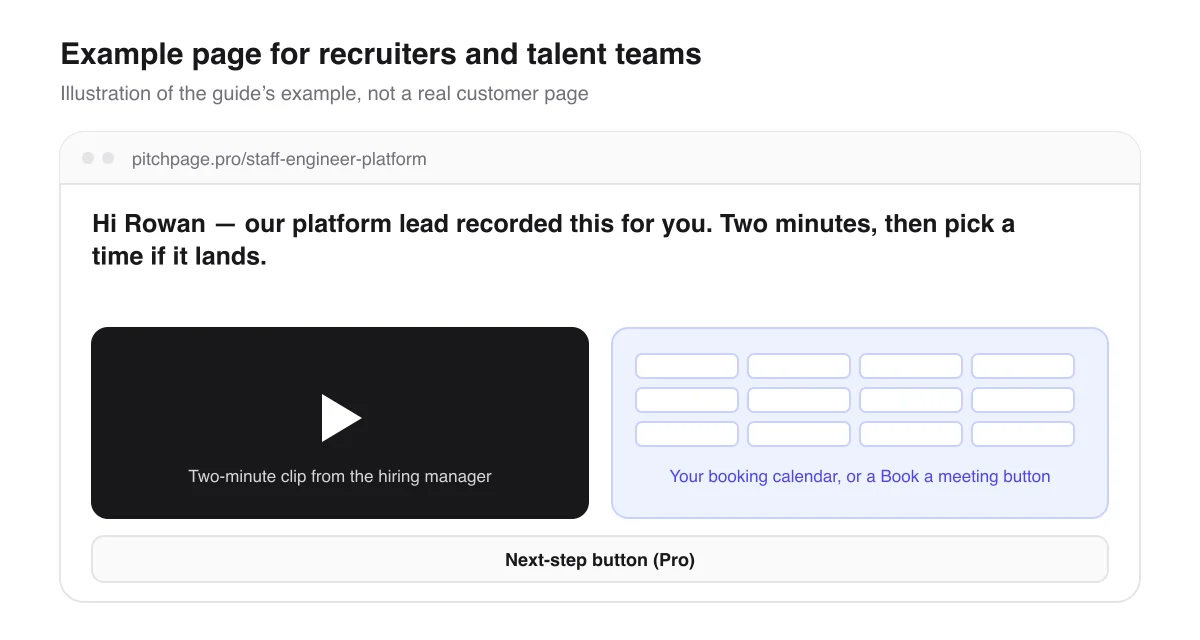
Say you are hiring a staff engineer for a platform team. The platform lead films a two-minute clip about the team and the problem and sends you the file; you upload it and build pitchpage.pro/staff-engineer-platform with the greeting “Hi Rowan — our platform lead recorded this for you. Two minutes, then pick a time if it lands.”
You send the link in an InMail. Rowan watches when it suits, books a first call right beside the video, and on Pro a button can lead to your ATS application.
Page title
Staff Engineer, Platform — the actual pitch
Hi Rowan — our platform lead recorded this for you. Two minutes, then pick a time if it lands.
An illustrative example of how this use case fills in the page — not a real customer page.
What should you know before you start?
A few limits, so the page does what you expect for recruiters and talent teams.
Video and pages
- Each page has one video and one scheduling link. For several candidates, make a page per candidate — 3 during the trial, unlimited on Pro.
- The video can be recorded in PitchPage, uploaded as a file of up to 5 minutes, or a Loom or YouTube link.
Interviews, privacy and applications
- Interviews are booked through your own scheduling tool, so the event type, availability and confirmations you already set up still apply.
- Pages start Unlisted and stay out of search, but anyone with the link can open one, so leave salary bands and internal details off if the role is confidential.
- The application button is a Pro feature and links to your ATS or a take-home brief. PitchPage does not collect applications or résumés.
Questions recruiters and talent teams ask
Can the hiring manager record the video?
Yes, without using your account. The manager can send you a video file to upload, or a Loom or YouTube link to paste in.
Can candidates book an interview from the page?
Yes. Your booking page sits beside the video — or opens from a Book a meeting button where your provider does not allow embedding — so the first conversation is booked without a back and forth.
Does PitchPage collect applications?
No. On Pro, a button links to your ATS application or take-home brief, and the candidate applies there.
Can I see whether candidates played the video?
You can see plays for each page, along with views and button clicks. You see totals, not who visited or how much of the video they watched, and bookings made in your scheduling tool are not counted.
Can I use a QR code at a career fair?
Yes. During the trial and on Pro, you can download a QR code for any published page as a PNG or SVG. Name a campaign, like career-fair, and Analytics shows the visits that came from that code.
What does it cost?
You pay $25/month for PitchPage Pro and can make unlimited pages, after a 7-day free trial that needs no card. The trial never turns into a paid plan on its own.
Where do the details about other tools come from?
What this guide says about embedding booking calendars and videos comes from each tool’s own documentation.
Build your first page
Put your video, your booking calendar and your next step on one link. Try PitchPage Pro free for 7 days — no credit card — then subscribe for $25/month when you are ready.
Start 7-day free trialOther ways people use PitchPage
Deciding between this and plain links? Compare PitchPage with sending a Loom link plus a Calendly link, or see how it compares with ViteLnk, Loom and Vidyard.