
Send one link with your walkthrough and your showing times.
By Shaf Shadaab · Published · Updated
Your buyers and sellers are often deciding on their phones. A video in one message and a scheduling link in another asks them to do the joining up themselves.
With PitchPage, you get one link per property or per client: your walkthrough plays at the top, and they can book a showing from the same page.
How can you share real estate listings with PitchPage?
You put your property walkthrough and your showing calendar on one link, so a buyer who likes the video can pick a viewing time on the same page.
You often get a short window of attention, on a phone. Portal links look like everyone else’s, and you do not want a buyer to lose momentum between "that looks good" and "when can I see it".
- Your walkthrough video arrives with no way to book a viewing.
- Your listing presentation becomes one more attachment to open.
- You repeat the same client update across text and email.
- Portal pages carry the portal’s brand, not yours.
An example workflow
How do you build a page for real estate professionals?
In three steps: film the property, then create the page, then send it anywhere.
- 1
Film the property
Film the tour on your phone and upload the file to PitchPage, record it with your camera in PitchPage, or use a YouTube or Loom link you already have.
- 2
Create the page
Add the video, your showing calendar, and a greeting naming the property or the client you are updating.
- 3
Send it anywhere
Text it, email it, or put it in a listing follow-up. For a flyer or an open house, print its QR code. Viewers can watch and book a showing from the same link.
What goes on a page for real estate professionals?
One video, one booking calendar and a greeting of up to 120 characters, plus a next-step button on Pro.
- Property walkthroughA phone or narrated video tour of the property.
- Showing calendarYour existing scheduling link for viewings.
- Personal greetingThe address, the neighborhood, or the client’s name in the headline.
- Next step buttonOn Pro, a button to your offer form, application or holding-deposit checkout.
What does an example page look like?
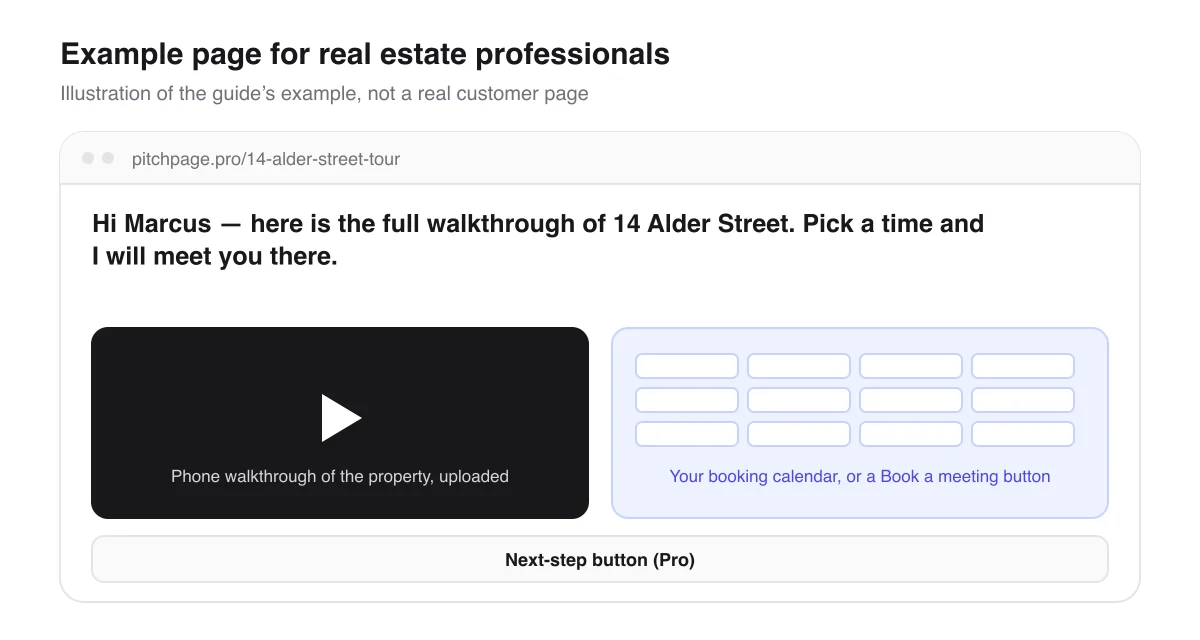
Say you are listing 14 Alder Street. You film a walkthrough on your phone, upload the clip to the page, and create it at pitchpage.pro/14-alder-street-tour with the greeting “Hi Marcus — here is the full walkthrough of 14 Alder Street. Pick a time and I will meet you there.”
You text Marcus the link. Marcus watches the tour on a phone, books a showing right below the video, and the viewing lands on your calendar. On Pro, a button can link to your offer form or application.
Page title
14 Alder Street — private tour
Hi Marcus — here is the full walkthrough of 14 Alder Street. Pick a time and I will meet you there.
An illustrative example of how this use case fills in the page — not a real customer page.
What should you know before you start?
A few limits, so the page does what you expect for real estate professionals.
Video and pages
- One page holds one video. For several properties, make a page per property — up to 3 during the trial, unlimited on Pro.
- Uploaded tours can be up to 5 minutes and 1 GB, so trim a longer one on your phone first, or use a YouTube or Loom link to a longer video. The video can be recorded in PitchPage, uploaded as a file of up to 5 minutes, or a Loom or YouTube link.
Showings and privacy
- Showings are booked through your own scheduling tool, so your availability and confirmations work the way you already set them up.
- Pages start Unlisted, but anyone with the link can open them, so never put lockbox codes or a seller’s private details on a page.
Questions real estate professionals ask
Can buyers book a showing straight from the page?
Yes. Booking pages from Calendly, Cal.com, SavvyCal and others appear with the video, so they pick a time without leaving the page. Where a booking page cannot be embedded, a Book a meeting button opens it instead.
Does the page work on phones?
Yes. On a phone the video plays at the top and the calendar sits below it, so the whole page works from a text message.
Can I upload a tour I filmed on my phone?
Yes, where your account has native video: upload an MP4, MOV or WebM of up to 5 minutes and 1 GB, or record with the phone’s camera in PitchPage. You no longer need to put it on YouTube first, though a YouTube or Loom link still works.
Can I update a page when the price changes?
Yes, while your trial or subscription is active. Edit the greeting, the video or the calendar and the same link shows the new version.
Can I put the page on a flyer or a yard sign?
Yes, with a QR code. During the trial and on Pro, you can download a QR code for any published page as a PNG or SVG. Name a campaign for each one, like open-house or yard-sign, and Analytics shows the visits that came from it. You see totals, not who visited or how much of the video they watched, and bookings made in your scheduling tool are not counted.
What does it cost?
You pay $25/month for PitchPage Pro and can make unlimited pages, after a 7-day free trial that needs no card. The trial never turns into a paid plan on its own.
Where do the details about other tools come from?
What this guide says about embedding booking calendars and videos comes from each tool’s own documentation.
Build your first page
Put your video, your booking calendar and your next step on one link. Try PitchPage Pro free for 7 days — no credit card — then subscribe for $25/month when you are ready.
Start 7-day free trialOther ways people use PitchPage
Deciding between this and plain links? Compare PitchPage with sending a Loom link plus a Calendly link, or see how it compares with ViteLnk, Loom and Vidyard.